#css-architecture #frontend-migration #responsive-design #refactoring #debugging-methodology #scope-discipline #dry-principle #cascade-and-specificity #technical-debt #documentation
What a Year-Long Frontend Migration Actually Teaches You About Software Engineering
2026-08-06 · 45 min read
Introduction
Large legacy systems rarely get rewritten. They get migrated — piece by piece, library by library, page by page — while staying online the whole time. This is unglamorous work: swapping a jQuery plugin for a modern one, upgrading a CSS framework, replacing a date picker. But precisely because it's unglamorous, it exposes fundamentals that greenfield projects often let you skip past.
The lessons below come from exactly that kind of work: a long-running effort to modernize the frontend of an existing management-portal-style application — moving from an older Bootstrap version and jQuery-plugin stack to a current one, one area of the app at a time, without breaking anything already in production. None of what follows is specific to that stack. Swap "Bootstrap 3 to 5" for "Angular to React," "jQuery to a modern picker," or "REST to GraphQL," and every principle still applies.
This is not a changelog. It's a set of transferable engineering habits, organized by concept.
1. Migrating Live Systems: The Parallel-Tree Pattern
What it is
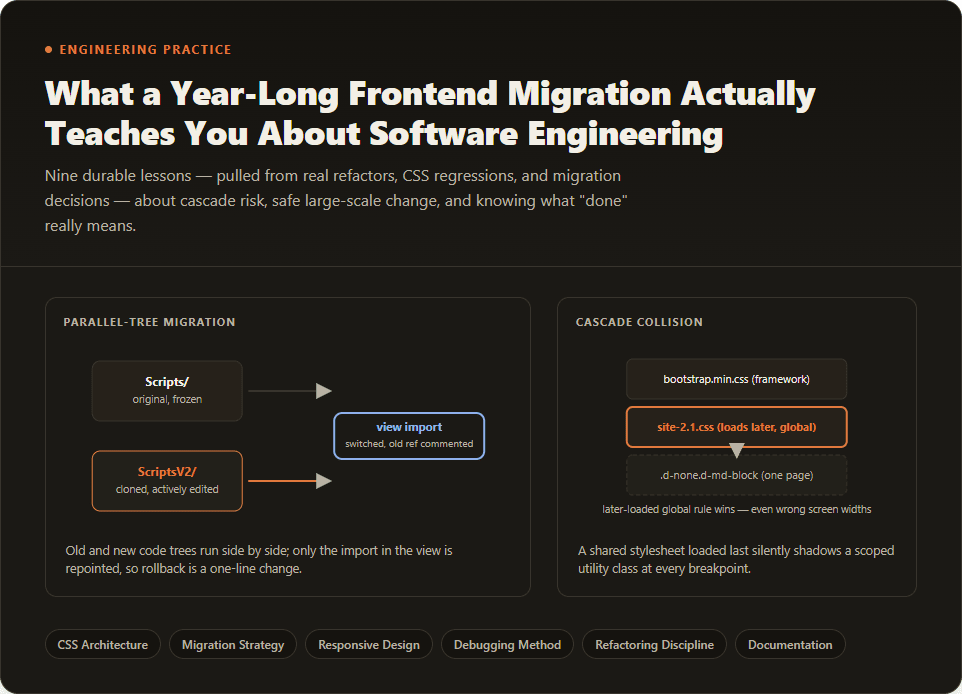
When you need to change how something works without being allowed to break how it currently works, you don't edit the original — you clone it, edit the clone, and switch the reference that points to it. In this project that meant: never touch wwwroot/Scripts/ or wwwroot/Content/ (the original, verified JS/CSS). Instead, copy the file into a parallel ScriptsV2//ContentV2/ tree with the identical folder structure, edit that copy, and change the one line in the page that imports it — commenting out the old <script src="~/Scripts/..."> tag and adding the new ~/ScriptsV2/... one next to it.
This is a specific, disciplined instance of a well-known pattern sometimes called the strangler fig pattern: new functionality grows up alongside the old system, gradually taking over responsibilities, until the old system can eventually be removed — but at every point in between, the old system is still fully intact and working.
Why it becomes a problem
The instinct when fixing something is to fix it where it lives. That instinct is correct for a small, isolated app. It is dangerous for a widely shared file, because a "fix" is really a behavior change, and shared files have many silent dependents. If site-2.1.css or bs3-compat.css is loaded on every page in the application, editing it to fix page A's bug can — and in this project, did — subtly break the twenty other pages that were already migrated and verified. Nobody asked for those pages to change; they changed anyway, as a side effect.
Common beginner mistakes
- Editing the shared/global file because "it's just a small tweak."
- Believing that if the change looks correct in isolation, it's safe everywhere — without checking who else depends on the file.
- Deleting or overwriting the old version outright, which removes the ability to instantly roll back by re-pointing an import.
- Conflating "I fixed the bug" with "I fixed it in the right place." A correct fix in the wrong location is still a regression waiting to happen.
Better engineering approach
Treat any file used by more than a couple of independent callers as a shared/global surface with its own blast radius. Before editing it, ask: who else loads this? If the answer is "most of the app," the safe move is almost always to make the change local and additive rather than global and mutating:
- Clone the file (or the specific selector/component) into a scoped location.
- Point only the page(s) you're actually working on at the new version.
- Leave the shared file's existing behavior untouched for everyone else.
- Let the migration itself — page by page — be the mechanism that eventually retires the old file, not a single risky edit to it.
This same instinct shows up in backend code too. A "dual constructor" pattern — where a class gets both a new dependency-injected constructor and keeps its old legacy constructor working — is the same idea applied to APIs instead of files: add the new path without deleting the old one until every caller has moved.
How to recognize it early
Ask, before any edit to a file: "If I'm wrong about this fix, how many other pages/features does it affect?" If the honest answer is "I don't know" or "many," that's the signal to clone-and-scope instead of edit-in-place. A quick grep for how many views #include/import/<link> the file is a two-minute gut check that prevents a much longer incident.
Broader lesson
Reversibility is a design property, not an accident. When a change is expensive to undo (a global CSS file, a shared library, a public API), the engineering move is to make the change cheap to undo instead — by making it additive, scoped, and toggleable — rather than hoping the edit itself is perfect.
2. CSS Cascade and Specificity: Why "It Works Here But Not There"
What it is
CSS doesn't apply rules in isolation — every rule competes with every other rule targeting the same element, and the browser resolves conflicts using two forces: specificity (how precisely a selector targets an element — an ID beats a class, a class beats a tag) and source order (when two rules have equal specificity, whichever one was loaded last wins). Think of it like a stack of transparent overlays on a photograph: the one on top, or the one drawn most precisely, is what you actually see.
Why it becomes a problem
Two real bugs from this project illustrate this precisely:
The .d-none shadow bug. Bootstrap 5 ships responsive-visibility helpers like .d-none combined with .d-md-block — hidden by default, visible from a medium breakpoint up. Bootstrap scopes its breakpoint-specific rule inside a @media (min-width: ...) block. But a separate, project-wide stylesheet — loaded after Bootstrap in the page <head> — had its own unconditional .d-none { display: none !important; }, with no media query at all. Because it loaded later and matched with equal specificity, it silently won at every screen size. An element marked d-none d-md-block stayed invisible even on a desktop screen, where it was supposed to show. Nothing was "broken" in the sense of a typo — the CSS was internally consistent. It just lost a cascade fight nobody was watching.
The floated-column bug. A legacy compatibility stylesheet applied float: left to any element with a class matching col-*, unconditionally, at every screen width. Real Bootstrap grid columns only take on their float/width at their own breakpoint (.col-md-4 only behaves like a quarter-width column at ≥768px; below that, it's meant to stack full width). Because the legacy override applied the float at all widths with no accompanying width rule, any column that lacked a base-tier class (col-12) shrank to fit its content on mobile instead of stacking — a <select> looked oddly narrow, not because of a typo, but because two different CSS mental models were fighting over the same class name.
Common beginner mistakes
- Assuming a visual bug means "wrong class name" and hunting for typos, instead of checking what else targets that selector.
- Not knowing that
!importantand load order interact — two!importantrules don't "cancel out"; the later one in the cascade still wins when specificity ties. - "Fixing" the bug by adding more
!importanton top, which just adds another layer to an already-fragile stack instead of resolving the actual conflict. - Not realizing that a global/shared stylesheet loaded on every page is effectively invisible — it's not in the file you're looking at, so it's easy to forget it exists at all.
Better engineering approach
When a utility class "isn't working," open browser DevTools and look at the computed style panel, not just your source file — it shows every rule competing for that property and which one is winning, struck through if it lost. That single habit collapses hours of guessing into seconds.
Structurally, the fix is rarely "edit the global file that's causing it" (see the parallel-tree principle above) — it's to avoid the colliding pattern on the pages you control, or scope your override with a selector specific enough to win deliberately and predictably, rather than accidentally.
How to recognize it early
Any time a class that should visually change an element "doesn't seem to take effect," before assuming a logic bug: check computed styles, check what stylesheet won, and check load order. If a fix works on one page but the same class combination silently fails on another, that's a near-certain sign of a cascade collision from a shared global file, not a per-page mistake.
Broader lesson
CSS is not just declarative styling — it's a conflict resolution system, and every large codebase accumulates rules that quietly compete. Treat a "visual bug that makes no sense" as a specificity/order question first, a typo question second.
3. Responsive Design Is a Model, Not a Utility Class
What it is
Mobile-first responsive design works on a specific mental model: a base (mobile) layout applies by default, and breakpoint-prefixed classes (col-md-4, d-lg-flex) add or override behavior only from that breakpoint upward. If you never specify a base-tier class, the unstyled default is what mobile users get.
Why it becomes a problem
The floated-column bug above is really a responsive-design misconception at its root: developers wrote class="col-md-4" believing it meant "this column is always roughly a quarter width," when Bootstrap's actual contract is "this column becomes a quarter width from medium screens up — below that, it's whatever the base tier says, and if there's no base tier, it's unstyled." Pairing col-md-4 with col-12 (full-width by default, quarter-width from medium up) is not decoration — it's the actual responsiveness. Skipping the base tier isn't "responsive-but-simplified," it's not responsive at all; it just happens to look fine on the screen size the developer tested on.
Common beginner mistakes
- Testing only at desktop width (the default browser window size) and never resizing down, so a totally broken mobile layout goes unnoticed.
- Treating a breakpoint-prefixed class as a "one-size adjustment" rather than "the override that starts at this width."
- Wrapping content in responsive helpers (
d-none d-md-block) as a reflex, even when the content has no actual visual weight (an empty spacer<div>) — adding complexity and cascade risk for no real benefit. (See §2 — this project ultimately learned that an empty spacer doesn't need to be hidden on mobile at all; it doesn't cause a visible problem even unstyled.)
Better engineering approach
Always pair a breakpoint class with an explicit base-tier class, even if the base tier is just "stack full width": col-12 col-md-4, not col-md-4 alone. Test every layout by physically narrowing the viewport (or DevTools' device toolbar) before calling it done — "did I resize the window?" is one of the cheapest quality gates in frontend work and one of the most skipped.
How to recognize it early
Grep for col-md- or col-lg- usages that have no sibling col- (or col-6, col-12) class in the same class attribute — that pattern is a near-guaranteed mobile bug waiting to be found, and it's mechanically searchable across an entire codebase before a user ever reports it.
Broader lesson
Responsive design bugs are rarely about "does this look good on my monitor" — they're about correctly modeling which rule applies at which width, and that means testing the model, not eyeballing one snapshot of it.
4. Flexbox Alignment With Content That Changes Size
What it is
align-items: center in a flex row vertically centers each child against the row's tallest child. align-items: start (or flex-start) pins every child to the top of the row instead, regardless of height differences.
Why it becomes a problem
A form row with a label and an input, centered vertically, looks perfect — until a validation error message appears below the input. Now that column is taller than its sibling, and centering shifts everything in the row to stay centered against the new tallest column: the label visibly drops out of alignment with its input, and so do the other columns sharing that row, even ones that never showed an error at all. This is a bug that is invisible on the happy path and only appears exactly when something goes wrong for the user — which is often when it's least acceptable to look broken.
Common beginner mistakes
- Designing and testing a form only in its default (no-error) state, where
align-items-centerlooks flawless. - Not recognizing that flexbox alignment is computed relative to sibling height, so a change in one column visually disturbs unrelated columns in the same row.
- Fixing the symptom locally (nudging the one broken label with a margin hack) instead of fixing the alignment rule that caused it.
Better engineering approach
Default form rows that can ever show a validation message to align-items: start — pair it with matching top padding on the label (so it still lines up with the input's first line in the normal case) and it looks identical when there's no error, but doesn't cascade-break when there is one. Reserve align-items: center only for rows that are provably immune to variable-height content (and treat any exception as a deliberate, explicit choice rather than a leftover default).
How to recognize it early
Don't just eyeball a form's happy path — deliberately trigger the validation state (submit empty, submit an invalid date range) and look at it. If a review or test pass never renders the "broken" state of a UI, it hasn't actually verified the UI.
Broader lesson
Any layout decision made while looking only at the default state of dynamic content is unverified. Real interfaces spend real time in their edge states — loading, empty, error, overflowing — and those states deserve to be part of what "done" means, not an afterthought discovered by a user.
5. DRY and the Single Source of Truth Wrapper
What it is
DRY ("Don't Repeat Yourself") means a given piece of knowledge or behavior should exist in exactly one place in a codebase. When the same script tag, the same plugin initialization, or the same configuration logic is duplicated across many files, you don't have one behavior — you have many copies of a behavior that are only accidentally the same, and will drift the moment someone updates one copy and forgets the rest.
Why it becomes a problem
Two versions of the same problem showed up repeatedly in this project: a date-picker plugin was initialized directly, with slightly different options, in dozens of files — meaning a future change to defaults (locale, min/max date handling) would require finding and editing every one of them, correctly, without missing any. Similarly, the same <script>/<link> include for a shared library was pasted into every view that needed it.
Common beginner mistakes
- Copy-pasting a working snippet into a new file "because it's fast," without noticing it's now the fourth or fifth copy.
- Believing duplication is fine because "these files are unrelated" — duplication isn't about file relatedness, it's about whether the behavior is meant to stay identical over time.
- Building the abstraction too early, for something that's only used once — DRY is a response to repetition, not a rule to apply preemptively to single-use code.
Better engineering approach
Once a pattern shows up in three or more places, extract it: a single wrapper function for a plugin (so all defaults, locale settings, and future changes live in one file and are simply called everywhere else), or a single shared partial/include for repeated markup or script references. The concrete threshold ("three files") is less important than the principle — the extraction should happen at the first sign of a repeated pattern, not after the tenth copy makes refactoring painful.
How to recognize it early
When you're about to copy a block of code into a second file, stop and ask: if this needs to change later, do I want to remember every place I copied it? If the answer is no, extract it now, while there are only two copies to consolidate, not twelve.
Broader lesson
DRY isn't about typing less — it's about collapsing the number of places a decision can go wrong. A wrapper function is a promise: "however this behaves, it behaves that way everywhere," which is a promise duplication can never keep.
6. Refactoring Must Preserve Behavior, Not Just Appearance
What it is
A refactor (or a technical migration, like swapping one library for a newer version) is supposed to change how something is implemented without changing what it does. This is a meaningfully different activity from a redesign, which is allowed to change behavior on purpose.
Why it becomes a problem
When migrating a date picker or a data table library, it's tempting to reach for the new library's clean, generic default configuration and call the migration done — it looks the same, it works, ship it. But the old configuration often wasn't decorative. A date range restriction that disables certain dates, or a data table's frozen/fixed columns, frequently encodes an actual business rule: "you cannot select a date before enrollment," "this identifying column must always stay visible while scrolling." Silently dropping that configuration during a version upgrade isn't a UI simplification — it's a functional regression wearing the disguise of a technical change, and it's especially dangerous because nobody explicitly asked for the behavior to change, so nobody's watching for it to break.
Common beginner mistakes
- Treating "the new component renders and looks right" as proof the migration is complete, without diffing the actual configuration options against what the old version specified.
- Assuming a library upgrade is purely mechanical (find-replace the API) when the old call site encoded business logic in its options, not just presentation.
- Not distinguishing, even mentally, between "I am replacing the engine" and "I am also changing what the car does" — these require very different levels of review.
Better engineering approach
Before migrating any component that has configuration (not just markup), pull up the actual prior implementation — not a paraphrased comment about it, not a summary in a migration doc, but the real source — and treat every option there as a deliberate requirement until proven otherwise. Replicate business-relevant configuration exactly; only simplify the parts that are genuinely presentational.
How to recognize it early
Ask, for any component being migrated: "does this have options beyond pure styling — min/max constraints, fixed/frozen elements, custom sort or filter logic?" If yes, that configuration needs an explicit line-by-line comparison against the old version before the migration can be called complete, not just a visual smoke test.
Broader lesson
"It looks the same" and "it behaves the same" are different claims, and only one of them is usually tested by eye. Configuration is code — treat changes to it with the same rigor as changes to logic, because business rules hide in options just as easily as they hide in if statements.
7. Source of Truth vs. Documentation Rot
What it is
Documentation rot is what happens when written descriptions of a system — comments, migration notes, planning docs, progress trackers — stop being updated as the system itself changes, but keep looking authoritative. The code is always the ground truth for what a system actually does right now; documentation is, at best, a snapshot that may already be stale by the time you read it.
Why it becomes a problem
Two concrete failure modes appeared in this project. First: in-file comments left behind during a migration ("here's what the old code used to do") were sometimes lossy, single-line paraphrases of a much more detailed original — reconstructing the true prior behavior from the paraphrase alone produced a subtly wrong answer, discovered only by going back to the actual prior source. Second: a large planning document tracked migration progress with checkboxes per feature area — and every single checkbox stayed unchecked throughout, regardless of how much work had genuinely been completed, because nobody was maintaining the tracker as a live status report; it was a static template being mistaken for a dashboard.
Common beginner mistakes
- Trusting a comment's description of "the old behavior" as verbatim fact, rather than as one person's (possibly lossy) summary at one point in time.
- Using a progress-tracking document's checkboxes as the actual measure of what's done, instead of checking the real, current state of the code or version history.
- Assuming two documents describing the same system agree with each other — they often don't, and when they conflict, neither one is automatically right.
Better engineering approach
When the question is "what did this used to do" or "is this actually finished," go to the primary source: the real prior version of the code (via version control, not commentary about it), or the real current state of the files (via search, not a checklist someone forgot to update). Use documentation as a starting hypothesis to verify, not as a conclusion to cite. When two documents disagree, that disagreement itself is a signal worth surfacing — pick one as authoritative and verify it against the live system before trusting either.
How to recognize it early
Any time you're about to state a fact about "how it used to work" or "what's already done," ask whether that claim is anchored in comment/doc/summary text or in a direct read of the actual code/history. If it's the former, spend the extra two minutes to check the latter before it becomes the basis for a decision.
Broader lesson
Documentation describes intent and history; code describes current reality. The two drift apart constantly in any actively developed system, and the engineering habit that prevents costly mistakes is defaulting to the primary source whenever documentation and code could plausibly disagree.
8. Scope Discipline and Blast Radius
What it is
Scope discipline means doing exactly the work that was authorized, in exactly the place it was authorized — and treating any temptation to go further, even for a good reason, as something to flag rather than act on unilaterally. Blast radius is the set of things a change could plausibly affect, intended or not; good engineering habits keep that radius as small and as predictable as the task requires.
Why it becomes a problem
During a task scoped as "port an already-fixed UI pattern from area A (the reference) to area B (the target)," a gap audit found that area A's own "reference" files still had leftover unmigrated markup — genuine bugs. The instinctive move was to fix A too, on the reasoning that porting a known-broken pattern forward would just propagate the bug. That reasoning is sound in the abstract — but the task's authorization covered B, not A, and fixing A anyway meant making an unrequested change to a part of the system the requester wasn't expecting to be touched. It happened to be welcomed after the fact, but the sequence was backwards: the right order is surface the finding, let the person who owns the scope decide, and only then act — not act first and explain later, even when you're confident you're right.
A parallel version of this shows up at a coarser grain: this project kept backend (.cs) changes strictly out of a branch scoped to frontend-only work, even when a backend bug was fully root-caused and the fix would have been small and safe. The value wasn't "backend fixes are less important" — it was keeping the diff reviewable, and the change's blast radius matched to what the branch was actually for, so a reviewer evaluating "did this migration break anything" isn't also silently evaluating an unrelated backend behavior change.
Common beginner mistakes
- "While I'm in here" scope creep — fixing an adjacent bug because it's convenient, not because it was asked for.
- Assuming that being correct about a fix is the same as being authorized to make it.
- Not distinguishing between investigating/diagnosing a problem (almost always safe) and modifying code to fix it (a decision that belongs to whoever owns that scope).
Better engineering approach
Diagnosis is (nearly) always fine — read, trace, root-cause, explain. Modification outside the explicitly agreed scope is a separate decision that isn't yours alone to make, no matter how confident or correct the fix is. When you find something out of scope, report it clearly (what's broken, why, how you'd fix it) and let the scope owner decide whether to expand the task — rather than deciding for them by just doing it.
How to recognize it early
Before touching a file, ask: "was this file part of what I was asked to change, or did I arrive here because it was adjacent to what I was asked to change?" If it's the latter, that's the moment to pause and ask, not the moment to fix and mention it afterward.
Broader lesson
Authorization and correctness are different axes. A change can be 100% technically correct and still be the wrong move if it wasn't the change anyone asked for — because the cost of an unrequested change isn't just the diff itself, it's the reviewer's trust that the scope of a change matches what they agreed to.
9. Debugging as an Empirical Science
What it is
Rigorous debugging treats a bug the way a scientist treats an unexplained observation: form a specific, falsifiable hypothesis about the cause, then design a measurement that would prove or disprove it — rather than changing code until the symptom goes away and calling that "the fix."
Why it becomes a problem
A visible layout artifact — a persistent gap and colored line on the right edge of a page — had a plausible-sounding cause already sitting in the code: a global CSS rule reserving space for a scrollbar, added earlier specifically to prevent page content from shifting when a modal dialog opens. The lazy fix would be to just delete the rule and see if the artifact disappears. Instead, the actual investigation compared the current branch against a known-good production version of the same page (which had no such rule and no such artifact) — direct evidence the rule was the cause, not a coincidence. Then, before concluding the rule was safe to remove, it tested the rule's original justification directly: open and close a real modal dialog on a genuinely tall page, and measure a fixed reference element's on-screen position (getBoundingClientRect()) before, during, and after — with and without the rule. The result: the modern version of the UI framework already compensated for the scrollbar itself, byte-for-byte, and the extra rule was actually fighting that built-in compensation rather than helping it. The rule solved a problem that no longer existed and created a new, worse one.
Common beginner mistakes
- Removing or changing code based on a plausible story ("this rule was probably added for X, and X seems unrelated to my bug") without testing that story.
- Fixing the symptom you can see without checking whether the original reason the code existed is still valid — which risks reintroducing the original problem the moment you "fix" the regression.
- Treating "it looks fixed" as sufficient evidence, instead of a measurable, repeatable comparison (pixel positions, computed styles, a known-good reference build).
Better engineering approach
Where possible, compare against a known-good reference — an older production version, a different branch, a competitor's implementation — rather than reasoning about "should" in the abstract. Where a fix might remove protection against a different problem, explicitly re-test that other problem's original trigger before shipping the fix, using a concrete, measurable signal (element position, computed style, network timing) rather than a visual glance.
How to recognize it early
If your explanation for a bug fix is "I think this is probably why" rather than "I measured X, it confirmed Y," you don't have a diagnosis yet — you have a hypothesis. That's a fine place to start, but not a fine place to stop before shipping a change to shared code.
Broader lesson
Confidence in a fix should come from a comparison you ran, not a story you told yourself. The extra ten minutes spent measuring instead of assuming is what separates a fix from a guess that happened to work this time.
10. A Note on Dependency and License Awareness
Briefly, one more habit worth naming: when this project adopted a modern rich-text editor library, it did so knowing that the library had, at that version, moved to a GPL license — a copyleft license with real implications for a commercial product, in exchange for being self-hosted rather than pulled from someone else's CDN. The important thing isn't the specific license — it's that the tradeoff was made consciously and documented, not discovered as a surprise during a later compliance review. Every dependency you add carries a license, an update cadence, and a maintenance burden; treating that as a deliberate decision (with the reasoning written down somewhere) rather than an implicit side effect of npm install is a small habit that prevents much larger headaches later.
Other Topics Worth Their Own Deep Dive
A few more concepts surfaced in this body of work that deserve more space than fits comfortably here, and are worth exploring separately: workspace hygiene and ephemeral artifacts (why verification screenshots, temp scripts, and other by-products of doing the work shouldn't become permanent noise in the repository); naming consistency as an API contract (why a single, well-named wrapper function like a shared date-picker call communicates its intent better than a dozen slightly different raw plugin initializations); and dependency injection's dual-constructor pattern as a general strategy for introducing a new way of doing something without breaking every existing caller of the old way — the same additive-not-destructive instinct as the parallel-tree file pattern, applied to object construction instead of file trees.
Conclusion
None of these ten lessons are exotic. Individually, each sounds almost obvious once stated: don't edit shared files carelessly, test the cascade instead of guessing, verify the mobile layout, watch dynamic content states, extract repeated code, preserve business logic through refactors, trust code over comments, respect scope boundaries, measure instead of assume, and think about licenses deliberately. What makes them valuable isn't novelty — it's that they're exactly the habits that separate code which merely works today from code that survives being touched by someone else, on someone else's screen size, in someone else's edge case, six months from now. A long migration is, in the end, a forcing function that makes you practice all of them at once — which is why it teaches them so well.